Multi-Agent AI Is a Distributed Systems Problem: Plan Accordingly
Microsoft announced agents talking to agents at Ignite 2025. What they didn't address: the distributed systems complexity that creates. If you've built microservices architectures, this will feel familiar. If you haven't, you're about to learn some hard lessons.

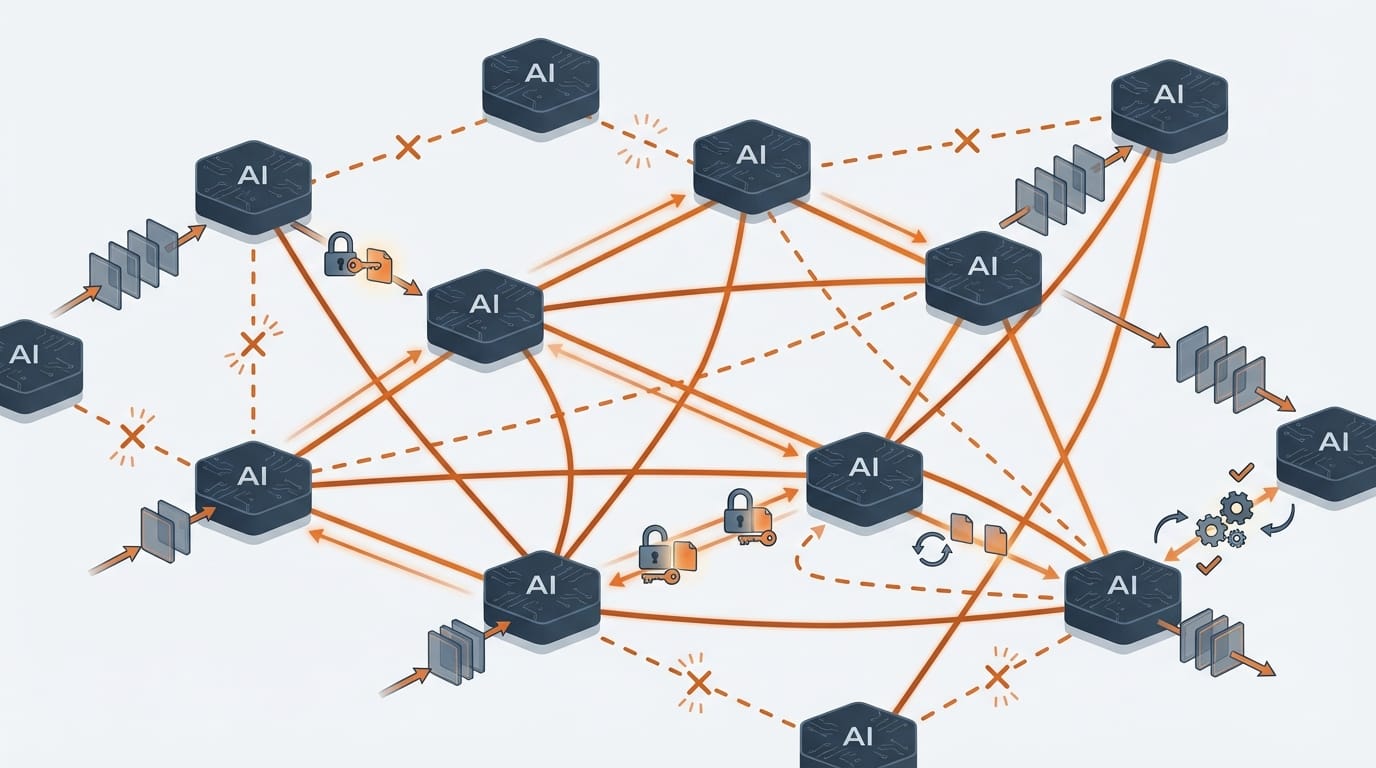
At Ignite 2025, Microsoft announced that Teams agents can now connect to Jira, GitHub, and Asana through MCP servers. The scenario they described was smooth: a user asks about project blockers, the agent pulls risks from Jira, schedules a meeting with the team, and the answer appears in seconds.
What the announcement didn't address: What happens when Jira is slow? What happens when the authentication token expires mid-request? What happens when the Teams agent retries and Jira processes the request twice? What happens when five agents are calling each other in a chain and the third one fails?
If you've built microservices architectures, you already know where this is going. Multi-agent AI coordination isn't a new problem. It's distributed systems with a new interface.
I spent years on Azure's Customer Advisory Team helping enterprises build distributed systems. The same patterns that broke microservices deployments will break multi-agent deployments. The same solutions that worked for microservices will work here. But only if you recognize the problem for what it is.
Why Distributed Systems Are Hard
Single-agent systems are straightforward. A user asks a question. The agent processes it. The agent responds. If something fails, you retry or show an error. The failure modes are predictable.
Multi-agent systems are different. When Agent A calls Agent B, and Agent B calls Agent C, you've created a distributed transaction. Now you have:
Authentication chains. Each agent needs credentials to call the next agent. Those credentials expire. They get revoked. They have different permission scopes. Agent A might have permission to call Agent B, but Agent B might not have permission to call Agent C on Agent A's behalf. Debugging these failures is painful.
Partial failures. Agent A calls Agent B and Agent C in parallel. Agent B succeeds. Agent C times out. What do you return to the user? The partial result? An error? Do you retry Agent C? What if Agent C actually processed the request but the response got lost?
State inconsistency. Agent A updates a record in System X, then calls Agent B to update a related record in System Y. Agent B fails. Now System X and System Y are inconsistent. How do you roll back? Can you roll back?
Cascading failures. Agent C is slow because its backend database is overloaded. Agent B waits for Agent C and times out. Agent A waits for Agent B and times out. Meanwhile, users keep making requests, backing up the queue. One slow dependency brings down the entire agent network.
Observability gaps. A user reports that "the agent gave a wrong answer." Which agent? At which step? What data did it see? What decisions did it make? If you can't trace a request through the entire agent chain, you can't debug it.
These aren't theoretical problems. I watched them happen in microservices deployments for years. They'll happen in multi-agent deployments too.
What's Different About AI Agents
Multi-agent systems inherit all the problems of distributed systems. But AI agents add failure modes that traditional microservices don't have.
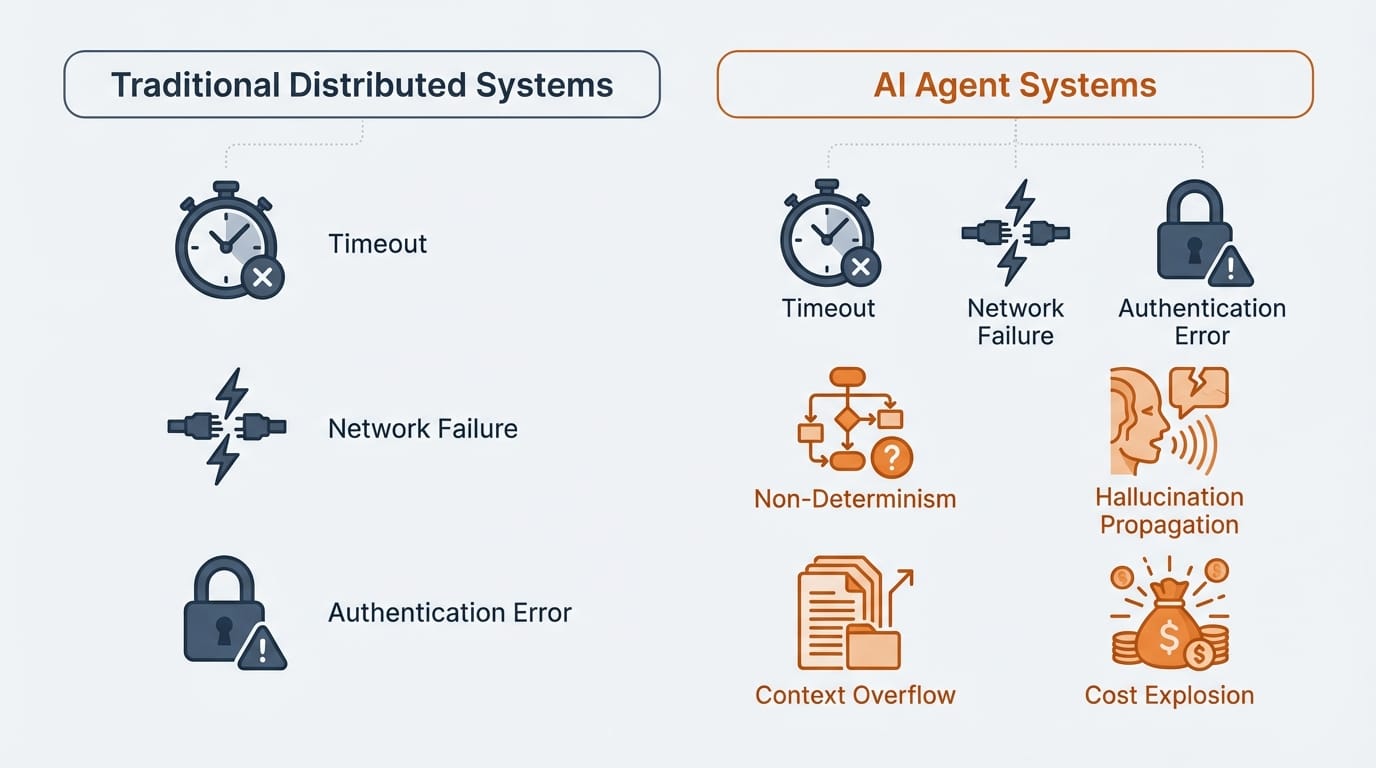
Non-determinism. Call the same microservice twice with the same input and you get the same output. Call the same AI agent twice and you might get different responses. This makes testing harder. It makes idempotency harder. And it makes debugging production issues harder because you can't reliably reproduce them.
Hallucination propagation. Agent B hallucinates a fact. It passes that fact to Agent C. Agent C makes a decision based on that hallucinated fact. Now you have confident garbage flowing through your system. Unlike traditional data corruption, hallucinated data looks plausible. Your validation logic won't catch it because it's syntactically correct. This is poison that spreads.
Context window limits. When Agent A passes data to Agent B, what happens if the payload exceeds Agent B's context window? Maybe it truncates. Maybe it summarizes. Maybe it silently drops information. You won't get an error. You'll get a response based on incomplete data. I've seen production bugs that took weeks to diagnose because the root cause was context truncation three agents back in the chain.
Cost explosion. Every agent call is an LLM inference. Every retry multiplies your API costs. A retry loop that would cost pennies with a traditional API can cost dollars with LLM calls. I've seen teams burn through monthly budgets in hours when retry logic spiraled. Multi-agent systems need budget guardrails that traditional systems don't.
Rate limit cascades. Azure OpenAI has tokens-per-minute limits. When multiple agents hit the same model endpoint simultaneously, you get 429 errors. Those errors trigger retries. Those retries compound the problem. One busy agent can starve other agents of capacity.
Plan for these. Your traditional distributed systems playbook is necessary but not sufficient.
How MCP and Entra Agent ID Actually Work
Microsoft built Agent 365 with multi-agent coordination in mind. But the details matter. Let me explain what you're actually getting.
Model Context Protocol (MCP) is an open standard that provides a common interface between agents and data sources. Think of MCP servers as standardized adapters. Instead of building custom integrations for Jira, GitHub, Dynamics 365, and SharePoint, you connect to MCP servers that expose those systems through a consistent protocol.
MCP servers handle the translation between what an agent asks for ("get open issues assigned to me") and how each system represents that data. Microsoft announced MCP servers for Dataverse (now GA), Dynamics 365, GitHub, Jira, and Asana at Ignite, with more coming.
What MCP doesn't do: It doesn't handle retries, circuit breakers, or compensation logic. It doesn't trace requests across agent chains. It's an integration protocol, not an orchestration framework. You still need to build the reliability layer yourself.
Entra Agent ID gives every agent a first-class identity. Agents authenticate using OAuth 2.0 with specialized token exchange patterns. There are three primary modes: agents acting on behalf of users (using On-Behalf-Of flows), agents acting autonomously with their own identity, and agents operating as "agent users" with user-like capabilities.
For multi-agent scenarios, Entra provides agent-to-agent discovery and authorization using MCP and A2A (Agent-to-Agent) protocols. The token claims tell you who's involved: xms_act_fct identifies who's performing the action, xms_sub_fct identifies who the action is ultimately for. This matters for audit trails and permission enforcement in complex delegation chains.
Here's what I wish Microsoft explained more clearly: the token exchanges within the agent hierarchy are complex. An agent identity blueprint impersonates an agent identity, which can impersonate an agent user. Each step requires credential validation. Each step can fail. Microsoft strongly recommends using their SDKs rather than implementing these flows manually, and I agree. The documentation has 50+ articles on Agent ID alone.
What you get from Agent 365:
- Agent identity and authentication (Entra Agent ID)
- Registry of agents and their capabilities
- Agent-to-agent discovery using MCP and A2A protocols
- MCP servers for connecting to data sources (Dataverse, Dynamics 365, etc.)
- Basic observability and logging
- Access control policies through Conditional Access
What you still have to build:
- Retry logic with exponential backoff (and cost awareness)
- Circuit breakers to prevent cascading failures
- Idempotency to handle duplicate requests safely
- Saga pattern for distributed transactions
- Distributed tracing across agent chains
- Timeout management and SLAs between agents
- Fallback behaviors when agents are unavailable
- Budget guardrails for LLM costs
If you're running a single agent that answers questions from your company's SharePoint, you don't need most of this. If you're building workflows where multiple agents coordinate to complete tasks, you need all of it.
Patterns That Work
I've seen what works and what doesn't in distributed systems. These patterns apply directly to multi-agent coordination, with some AI-specific adaptations.
Orchestration vs Choreography
You have two fundamental choices for coordinating agents.
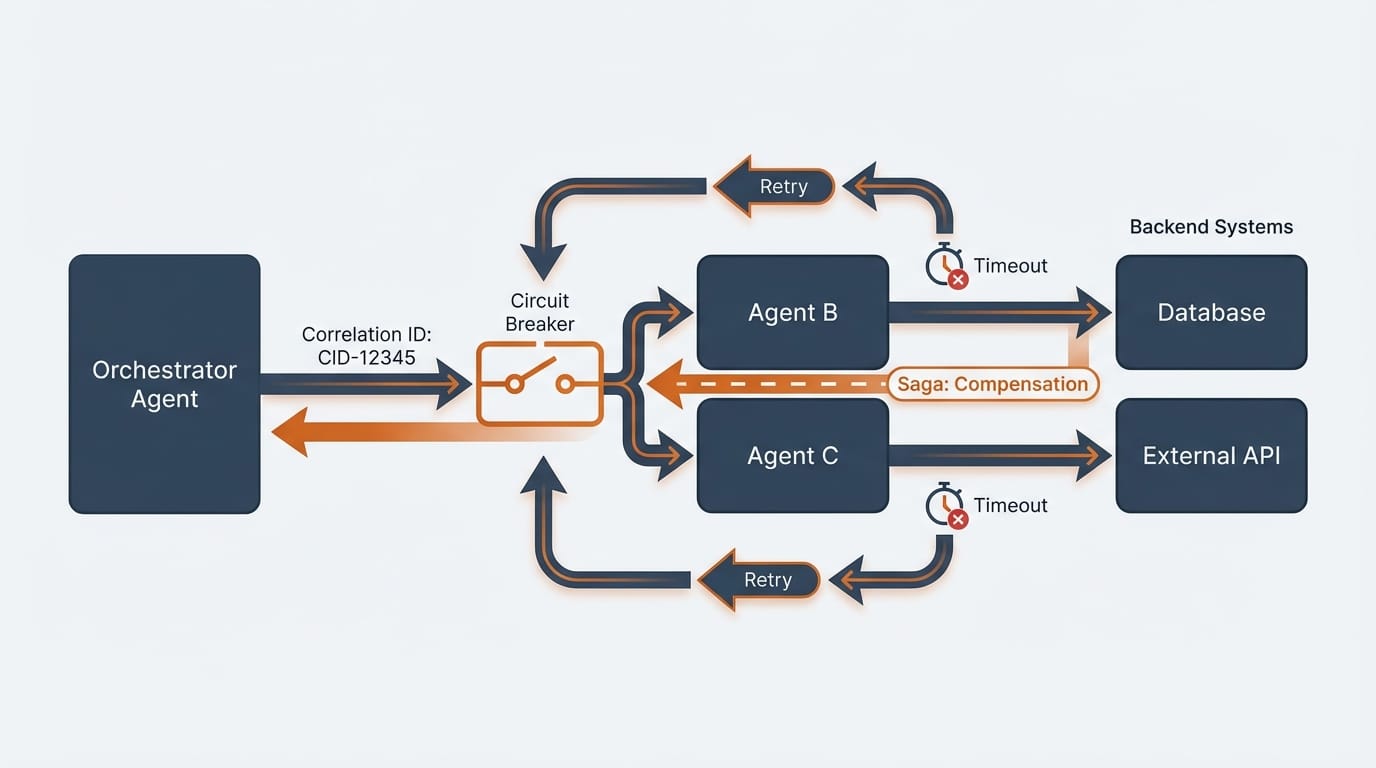
Orchestration uses a central coordinator. The orchestrator agent knows the workflow, calls other agents in sequence or parallel, handles errors, and assembles results. This is easier to understand and debug. The orchestrator has full visibility into what's happening. But it's also a single point of failure, and the orchestrator becomes a bottleneck at scale.
Choreography uses events. Agent A publishes an event. Agents B and C subscribe and react independently. No central coordinator. This scales better and has no single point of failure. But it's harder to understand the overall flow, harder to debug, and harder to implement transactions that span multiple agents.
My recommendation: Start with orchestration. It's easier to reason about and easier to debug. Move to choreography only when you hit scale limits or need independent deployment of agents. Most enterprise use cases don't need the complexity of choreography.
The Saga Pattern for Distributed Transactions
When Agent A updates System X and Agent B needs to update System Y, you have a distributed transaction. Traditional database transactions don't work across agent boundaries. The Saga pattern is the alternative.
A saga breaks a transaction into steps, each with a compensating action. If step 3 fails, you run compensation for steps 2 and 1 to undo their effects. It's not as clean as a rollback, but it's the only way to handle failures across independent systems.
Example: An agent workflow creates an order (step 1), reserves inventory (step 2), and charges a credit card (step 3). If the credit card charge fails, the saga runs compensation: release the inventory reservation (compensate step 2), cancel the order (compensate step 1).
Design your compensation actions before you design your forward actions. If you can't compensate, you can't safely use a multi-agent workflow.
Other Essential Patterns
Design for failure. Assume every agent call will fail. What happens then? If you don't have an answer, you don't have a production-ready system. Every agent interaction needs a timeout, a retry policy, and a fallback behavior.
Make operations idempotent (with caveats). If Agent B receives the same request twice, it should produce the same result without side effects. This is harder with AI agents because responses are non-deterministic. Focus on making the effects idempotent even if the responses vary. "Create a ticket with ID X if it doesn't exist" is idempotent even if the confirmation message differs each time.
Use async over sync. Synchronous agent chains are fragile. Agent A waits for Agent B waits for Agent C. If any link is slow, the whole chain is slow. If any link fails, the whole chain fails.
Async patterns are more resilient. Agent A publishes a message. Agent B picks it up when ready. Agent B publishes its result. I built this pattern to replace synchronous SAP calls at a major retailer. Transaction speed improved 25%. Outages dropped 10%. The same principle applies to agent chains.
Implement circuit breakers. When Agent C is failing, stop calling it. Let it recover. A circuit breaker tracks failure rates and "opens" when failures exceed a threshold. While open, calls fail fast instead of waiting for timeouts. This prevents one bad agent from taking down the entire system.
Set explicit SLAs and budgets. Agent A needs to know how long Agent B should take. If it takes longer, that's a failure. Without explicit timeouts, slow responses pile up. And because every call costs money, set budget limits per request. A runaway retry loop shouldn't be able to burn through your monthly LLM budget.
Trace everything. Every request needs a correlation ID that flows through the entire agent chain. When something goes wrong, you need to reconstruct exactly what happened. Which agents were called? In what order? With what data? What did each agent return? Without distributed tracing, debugging multi-agent systems is nearly impossible.
When to Avoid Multi-Agent Architectures
Not every problem needs multiple agents. Sometimes the coordination overhead isn't worth it.
Avoid multi-agent when:
- A single agent can handle the task with tool calls (MCP connections, APIs)
- Latency requirements are strict (each agent hop can add hundreds of milliseconds to several seconds depending on model and payload)
- The workflow is simple enough that a single agent with multiple tools is sufficient
- You don't have the engineering capacity to build proper coordination infrastructure
- Failure modes are unacceptable (multi-agent systems have more failure modes)
Consider multi-agent when:
- Different agents need different security contexts or permissions
- You need to compose capabilities from multiple teams or vendors
- The task naturally decomposes into independent subtasks
- You want to update or replace individual agents without affecting others
- Scale requirements differ across different parts of the workflow
I've seen teams reach for multi-agent architectures because they seem elegant. Then they spend months debugging coordination failures. Start with the simplest architecture that solves your problem. Add agents when you have a clear reason.
A Realistic Example
Here's what multi-agent coordination actually looks like in practice, including the messy parts.
Scenario: A compliance workflow where a user requests access to sensitive customer data. The request needs manager approval, compliance review, and audit logging.
Why multi-agent makes sense here:
- The compliance agent needs elevated permissions the user-facing agent shouldn't have
- Manager approval might take hours or days (long-running workflow)
- Audit logging needs to happen even if other steps fail
- Different teams own different agents (security owns compliance, HR owns approvals)
The workflow:
- Request Agent receives the access request
- Request Agent calls Approval Agent to get manager sign-off
- Manager approves (this might take 2 days)
- Approval Agent notifies Request Agent
- Request Agent calls Compliance Agent to verify the request meets policy
- Compliance Agent approves
- Request Agent calls Provisioning Agent to grant access
- Request Agent calls Audit Agent to log the action
What can go wrong:
- Manager never responds. You need timeout logic and escalation.
- Compliance Agent rejects after manager approved. You need to notify the manager their approval was overridden.
- Provisioning succeeds but Audit Agent is down. Access was granted but not logged. Compliance violation.
- User cancels the request mid-workflow. You need to compensate any completed steps.
- The Compliance Agent hallucinates that a policy exists. Access is denied based on a non-existent rule.
What you need to build:
- State machine to track workflow progress across days
- Compensation logic for each step
- Timeout handling with escalation
- Correlation ID through all agents for audit trail
- Human override capability when agents make wrong decisions
- Retry logic that respects rate limits and budgets
This is more complex than "agent calls agent." It's workflow orchestration with AI-specific failure modes layered on top.
What You Should Do
If you're planning multi-agent deployments, here's how to prepare.
Start with single-agent, multi-tool. Get one agent working well with MCP connections to your data sources. Many use cases that seem like multi-agent problems can be solved with a single agent that has access to multiple tools. Only add agents when you have a clear reason like different security contexts or different team ownership.
Build observability before you build agents. Before you deploy multiple agents, make sure you can trace requests through them. Implement correlation IDs. Set up logging. Build dashboards. You'll need this to debug production issues. I've seen teams deploy multi-agent systems without tracing and spend weeks hunting bugs that would have taken hours with proper observability.
Define failure modes and compensation explicitly. For every agent interaction, document: What happens if it times out? What happens if it returns an error? What happens if it returns invalid data? What's the fallback? What's the compensation? If you can't answer these questions, you're not ready for production.
Test failure scenarios, including AI-specific ones. Inject failures. Make agents slow. Revoke credentials mid-request. But also test what happens when an agent hallucinates, when context gets truncated, when you hit rate limits. These AI-specific failures are harder to simulate but as important.
Set budgets, not just timeouts. Every agent should have a response time budget and a cost budget. Monitor latencies and spending. Alert when either is breached. A slow agent causes cascading failures. An expensive agent causes budget overruns.
Have a kill switch. You need the ability to disable an agent quickly if it's misbehaving or hallucinating. Agent 365 gives you some of this through Conditional Access policies. Make sure you know how to use it before you need it.
The Pattern Repeats
Every few years, a new technology appears that makes distributed systems look easy. Web services. SOA. Microservices. Serverless. Now AI agents.
The interfaces change. The underlying problems don't. Distributed systems are hard because networks are unreliable, latency is unpredictable, and partial failures are inevitable. These constraints don't disappear because the nodes are AI agents instead of microservices. If anything, AI adds complexity: non-determinism, hallucinations, context limits, and cost sensitivity.
Microsoft built Agent 365 on solid foundations. Entra Agent ID solves the identity problem. MCP provides integration standards. The observability features give you visibility. But the hard work of building reliable distributed systems still falls on you.
If you're an architect planning multi-agent deployments, don't get distracted by the AI. Focus on the architecture. The patterns that made microservices reliable will make multi-agent systems reliable. The mistakes that broke microservices deployments will break multi-agent deployments, faster and more expensively.
Plan accordingly.
This three-part series covered enterprise AI agent adoption from Ignite 2025:
- The Shadow AI Problem That Agent 365 Actually Solves explained why Shadow AI happens and how Agent 365 addresses governance.
- Agent 365: Plan for 18 Months, Not 3 covered the implementation gap between demos and production.
- This post addressed the distributed systems challenge of multi-agent coordination.
The technology is real. Microsoft learned from cloud adoption and built Agent 365 on solid foundations. But technology alone doesn't guarantee success. You need realistic timelines, proper data preparation, and architectural patterns that handle failure.
Start simple. Build observability. Plan for failure. Scale when you're ready.