The Design Decisions Behind an AI-Native Document Format
Processing a Word document through raw OOXML costs 359,706 prompt tokens. Clean markdown costs 106. Five design decisions that make that gap useful without losing formatting.

Part 2 of 3 in the Sidedoc series. Read Part 1: Why AI Document Workflows Are Broken
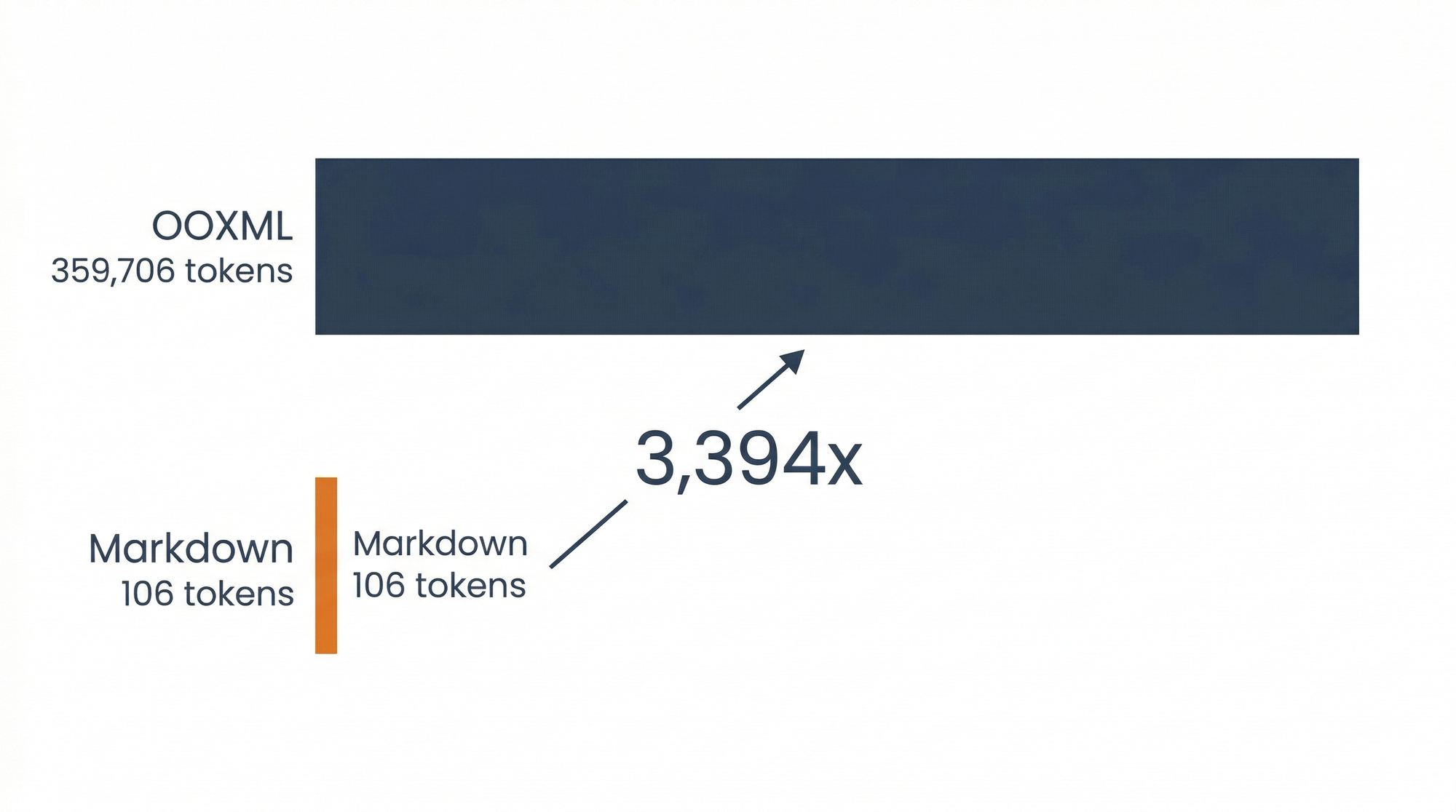
Processing a single Word document through raw OOXML extraction costs 359,706 prompt tokens. The same content as clean markdown costs 106 tokens. That's a 3,394x difference for the same summarization task.
I built a benchmark suite to measure this precisely: 15 test documents, 45 LLM task runs across summarization, single edits, and multi-turn editing. Across all tasks, clean markdown used 1,524x fewer prompt tokens than raw OOXML. At Claude Opus 4.6 pricing ($5 per million input tokens, $25 per million output tokens), that translates to $4.63 per document via OOXML versus $0.11 via markdown. A 42x cost difference.
But cost isn't even the most interesting finding. OOXML had a 20% failure rate across all task types: 9 out of 45 runs didn't return usable output. The model hit context limits, produced errors, or returned malformed content. Markdown extraction succeeded on every single run. One hundred percent reliability versus eighty percent.
Those numbers confirmed that the approach I'd been building, Sidedoc, was pointed at a real gap. This post walks through the design decisions behind the format and the thinking that shaped each one.
The Core Insight: Don't Make Two Audiences Share a Representation
AI doesn't need formatting. Humans don't need to read JSON. So why force them into the same file?
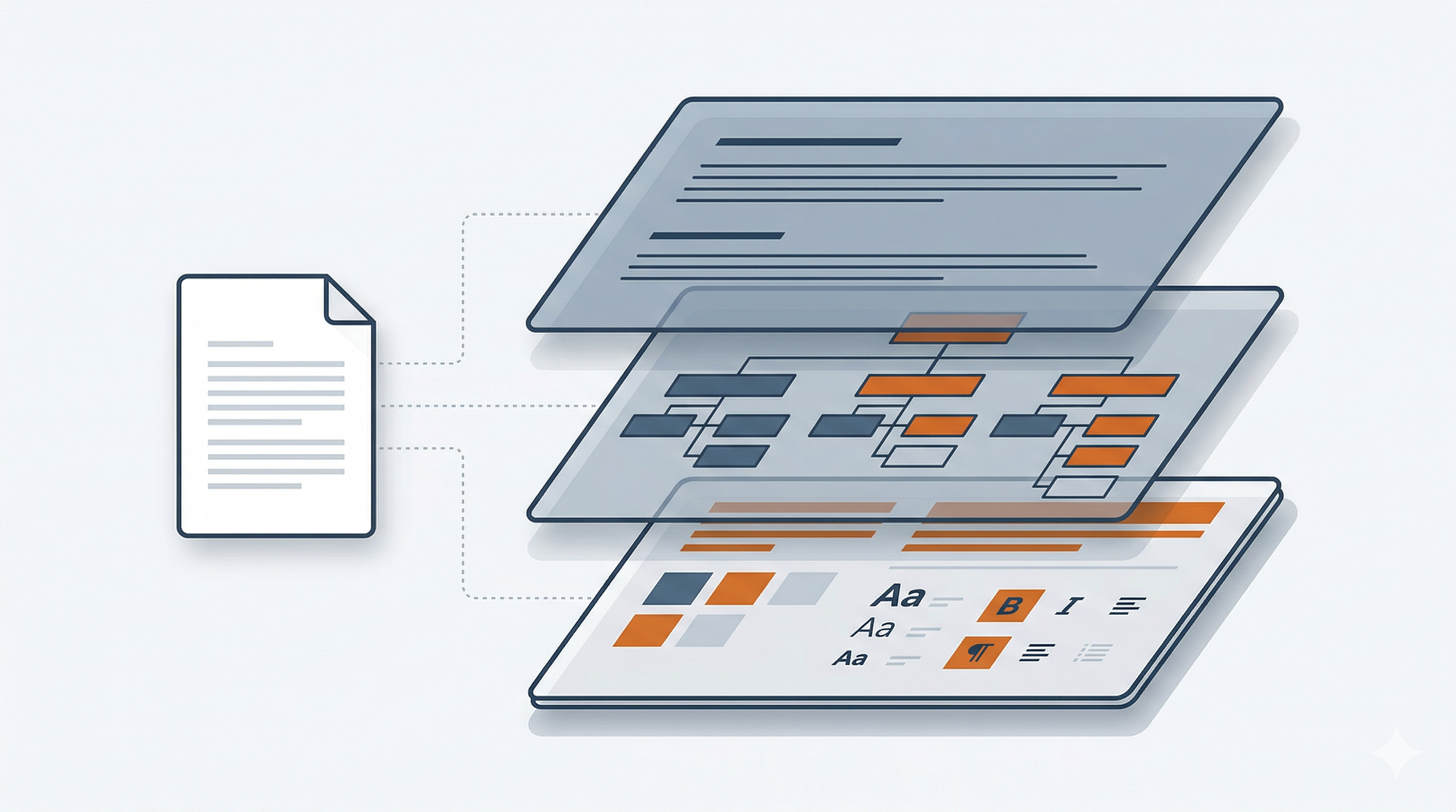
A Sidedoc extraction produces a .sidedoc/ directory:
document.sidedoc/
├── content.md         # Clean markdown (AI reads and writes this)
├── structure.json     # Block structure mapping content to docx paragraphs
├── styles.json        # Formatting per block (fonts, sizes, alignment)
├── manifest.json      # Metadata, hashes, version info
└── assets/            # Images and embedded files
content.md contains only words and structure. No formatting metadata, no XML artifacts. Just clean GitHub Flavored Markdown that any LLM reads natively. All the formatting that makes the original Word document look right (the fonts, colors, spacing, style names) lives in structure.json and styles.json. Machine-readable JSON that maps each content block back to its formatting in the original document.
The AI never sees the JSON. The human never edits it. Each file is optimized for its audience.
That's the architecture. The interesting part is what I learned building it.
Accept the Representation Gap When the Efficiency Gain Is Large Enough
The first question anyone asks: why markdown? And then immediately: but markdown can't represent everything in a Word document.
Both are right. Markdown can't express text boxes, shapes, nested layouts, or embedded charts. There is no markdown equivalent for those elements. But for the content markdown can represent (headings, paragraphs, lists, tables, images, hyperlinks), it is the most token-efficient structured format available. And it covers the vast majority of business documents.
The question I had to answer wasn't "can markdown represent everything?" It was "is the efficiency gain on representable content large enough to justify the gap?" The benchmark data made this concrete: 106 tokens versus 359,706 for the same document. Three orders of magnitude. At that ratio, accepting a representation gap on edge-case elements isn't a compromise. It's the only rational choice.
The alternative was inventing a richer content format that could handle the edge cases. I rejected that because it would have destroyed the key advantage: LLMs already know markdown. A custom format, no matter how capable, requires model-specific prompting and parsing. That's friction you pay on every single interaction. Markdown works out of the box with every model on the market.
This principle shows up in engineering decisions all the time. You rarely get a representation that covers 100% of cases. The question is whether the performance gain on the 90% justifies the gap on the 10%. When the gain is 3,394x, it does.
Optimize for How Work Actually Happens, Not How Files Get Shared
Early versions of Sidedoc used a .sdoc ZIP archive as the primary format. One file in, one file out. Clean and portable, like .docx and .epub.
I switched to directory-first after living with the ZIP approach for a few weeks. Three problems drove the change.
Git compatibility. A binary ZIP shows up as "file changed" in a diff with zero visibility into what actually changed. Useless for code review, useless for tracking document evolution over time. A .sidedoc/ directory gives you meaningful diffs on content.md, structure.json, and styles.json individually. You can see exactly what the AI changed and what formatting metadata shifted.
Direct file access. With a ZIP, every interaction requires extract, edit, re-archive. Three steps where one should suffice. With a directory, you open content.md in any editor, pipe it to any tool, or cat it into an LLM prompt directly.
CI/CD integration. Automated pipelines can operate on individual files in a directory. They can't reach into a ZIP without extracting it first. For the developer-workflow audience, directories are the native unit of work.
The ZIP format still exists as .sdoc via sidedoc pack for distribution and sharing. But the directory is where work happens.
This is a deliberate inversion of what most document formats do. They optimize for portability and treat editing as secondary. Sidedoc optimizes for editing and treats portability as a packaging step. The assumption baked into every other document format is that sharing comes first. That assumption made sense when documents moved between humans. It breaks when the primary consumer is an AI editing loop that touches the same file dozens of times before it ever gets shared.
Design for How AI Actually Edits, Not How Humans Do
The sync mechanism is where the format earns its keep. When an AI (or a human) edits content.md, the sidedoc sync command needs to figure out what changed. I use content hashes stored in structure.json. Each block has a hash of its content at the time of last sync. On the next sync, each block's current content is hashed and compared.
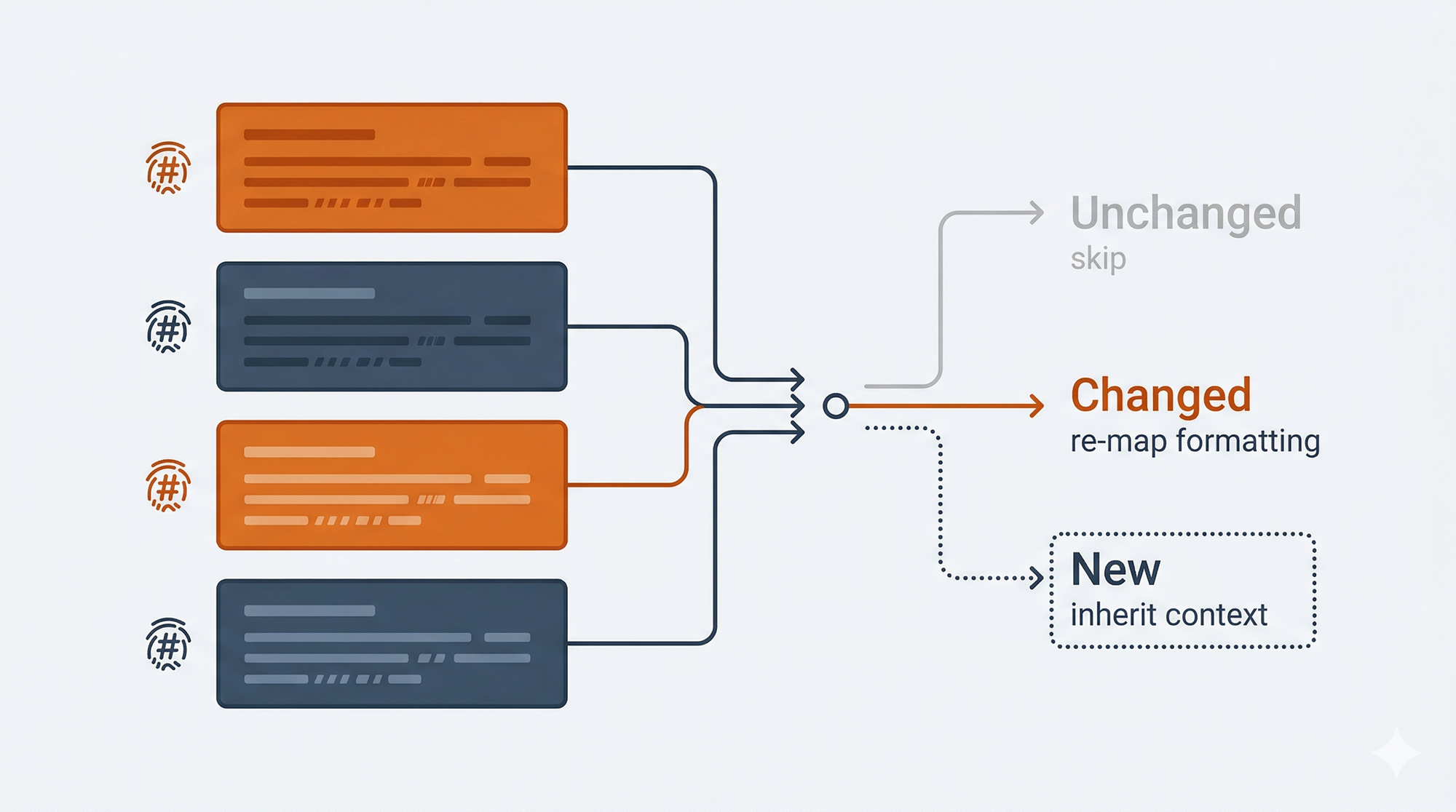
Changed blocks get their formatting metadata updated while preserving the original styling. New blocks inherit formatting from their context. Deleted blocks are removed from the structure and style maps.
The obvious alternative was diffing: track insertions, deletions, and modifications like a version control system. I rejected it for a reason that's easy to miss if you haven't spent time watching LLMs edit documents.
Models don't make neat, localized changes. They rewrite entire sections. They reorder paragraphs. They restructure lists into prose or prose into lists. A human editing a document makes surgical changes that diff algorithms handle well. An LLM makes sweeping changes that break diff-based assumptions about edit locality.
Hashing is resilient to this because it doesn't care about the nature of the change, only whether the content is different. A completely rewritten paragraph and a single-word fix look the same to the hash comparison: the block changed, re-map it.
The tradeoff: hashing can't distinguish between "this block was edited" and "this block was deleted and a new one was added in its place." In practice, this rarely matters. A new block at the same position inherits the same formatting context either way.
If you're building any tool that processes AI-generated output, this is worth internalizing. Diff-based approaches assume human editing patterns. AI editing patterns are structurally different, and your change detection needs to account for that.
Use Conventions Your Tools Already Understand
Tables were the most demanded feature from early feedback. Consulting deliverables, legal documents, financial reports: they all use tables heavily. Shipping without table support was a credibility problem for the target audience.
I had a choice: invent a richer table syntax that could represent merged cells, per-cell formatting, and alignment natively, or use the existing GFM pipe table format and push the complexity into the metadata.
I chose GFM. Every LLM already knows how to read and write pipe tables. Zero special prompting. Zero parsing. An AI can edit this without any instructions:
| Region    | Q1 Revenue | Q2 Revenue | Growth |
|-----------|-----------|-----------|--------|
| Northeast | $2.4M     | $2.8M     | 16.7%  |
| Southeast | $1.8M     | $2.1M     | 16.7%  |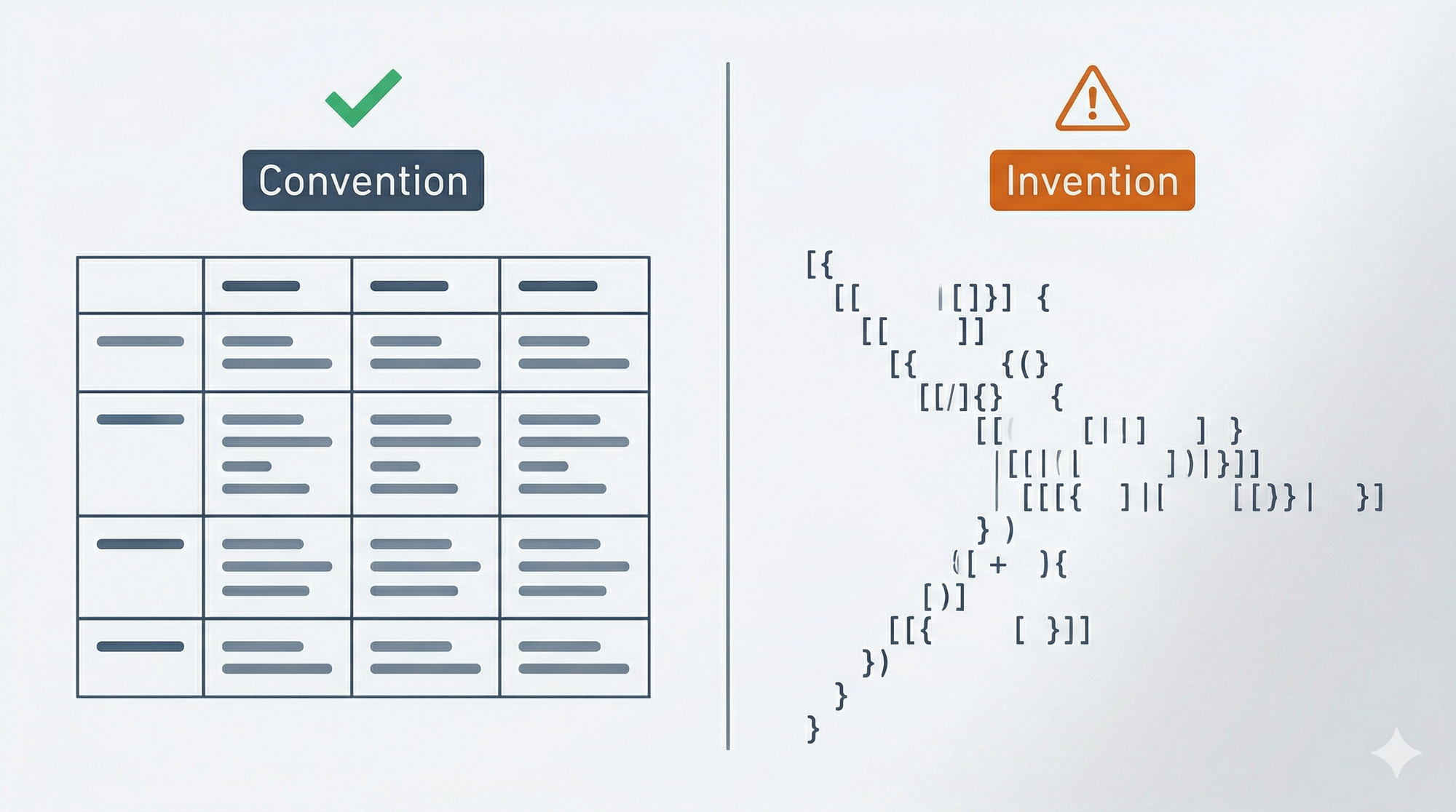
The complexity of merged cells, cell-level formatting, and border styling lives in styles.json where it belongs. When the AI edits the table content, the sync mechanism re-maps the content back to the cell structure, and the build step reapplies the formatting.
GFM tables can't represent every possible Word table layout in the markdown itself. Very complex merge patterns show as simplified grids in content.md, with the full structure preserved in metadata. For the document types Sidedoc targets, this limitation rarely surfaces.
This principle applies well beyond tables: use an existing convention that your tools already understand rather than inventing a more capable format that requires special handling. The same logic drove the decision to use CriticMarkup for track changes ({--deleted--}{++inserted++} syntax) rather than a custom notation. CriticMarkup isn't perfect. But LLMs already know it, editors already highlight it, and that zero-friction adoption outweighs whatever a custom syntax could offer.
Every time you invent a new syntax, you create a training gap. Your users (human or AI) have to learn it. Your tools have to parse it. Your documentation has to explain it. Existing conventions carry none of that cost.
What to Ship First
Knowing what to prioritize was as important as knowing what to build.
Sidedoc doesn't yet handle headers/footers, footnotes/endnotes, comments, text boxes, shapes, or charts. These elements exist in Word documents, and some of them are common. The work to support them is underway, but shipping without them was a deliberate sequencing decision.
The principle was coverage-per-effort. Headings, paragraphs, formatting, lists, images, hyperlinks, tables, and track changes cover the content that matters for the initial target workflows: AI editing branded documents, contracts, and reports. Starting here gets the format into real use while the remaining element types are being built. Each one has its own implementation complexity. Headers and footers, for instance, live in separate OOXML document parts, which means extending the extraction and rebuild pipeline rather than just adding another content type.
Nested lists beyond one level are the most notable current gap. They're preserved in the metadata but not yet editable through content.md. This is actively being worked on because it matters for outlines and complex document structures.
The full support matrix is on the format specification page and the implementation status page.
The Before and After
Here's the concrete workflow.
bash
# Extract a Word document into its sidedoc directory
sidedoc extract quarterly-report.docx

# AI edits content.md (any LLM, any tool, any pipeline)
cat quarterly-report.sidedoc/content.md | llm "Update Q3 projections..."

# Preview what changed
sidedoc diff quarterly-report.sidedoc

# Sync changes and rebuild the Word document
sidedoc sync quarterly-report.sidedoc
sidedoc build quarterly-report.sidedoc
# → quarterly-report.docx with original formatting intact
The AI works with ~100-350 tokens of clean markdown instead of ~360,000 tokens of XML. The formatting survives because it was never in the AI's path. Need another pass? Edit content.md again, sync, build. The formatting is still there because it was never at risk.
The diff command matters for review workflows. You can see exactly what the AI changed before committing to a rebuild. Useful when someone needs to approve changes before they hit the final deliverable.
Sidedoc is open-source (MIT licensed) and available on GitHub. Install with pip install sidedoc (Python 3.11+). The full format specification is at sidedoc.io.
Five Questions for Your Next Format Decision
Whether you're designing a document format, an API schema, or a data pipeline, these decisions come up in different shapes:
- Where is the representation gap, and is the efficiency gain worth it? Every format trades expressiveness for something. Know what you're trading and whether the math justifies it.
- Are you optimizing for how work happens or how artifacts get shared? The default is to optimize for distribution. If your format lives in an editing loop, that default is wrong.
- Does your change detection match your editor's behavior? Diff works for human edits. AI edits break diff assumptions. Match the detection mechanism to the actual editing pattern.
- Are you inventing syntax when a convention already exists? Every custom syntax creates a training gap for users and tools. Existing conventions carry zero adoption cost.
- What's the smallest scope that validates the approach? Ship what covers the core workflows. Build the rest once you've confirmed the architecture holds.
This is Part 2 of a three-part series. Part 1: Why AI Document Workflows Are Broken covers the problem. Part 3: What I Learned Building a Document Format from Scratch covers the builder's perspective: the origin story, the surprises, and what's next.